
Watu Technology LTD
  • 0 Shopping Cart
  • More
  • Account
    • Login
    • Forgot Password?
  1. Portal Home
  2. Knowledgebase
  3. cPanel - Control Panel
  4. How to Edit or Delete a Cronjob in cPanel

How to Edit or Delete a Cronjob in cPanel Print

  • 0

How to Edit a Cronjob?
1. Log in to your cPanel account.

2. In the Advanced section, click on Cron Jobs.


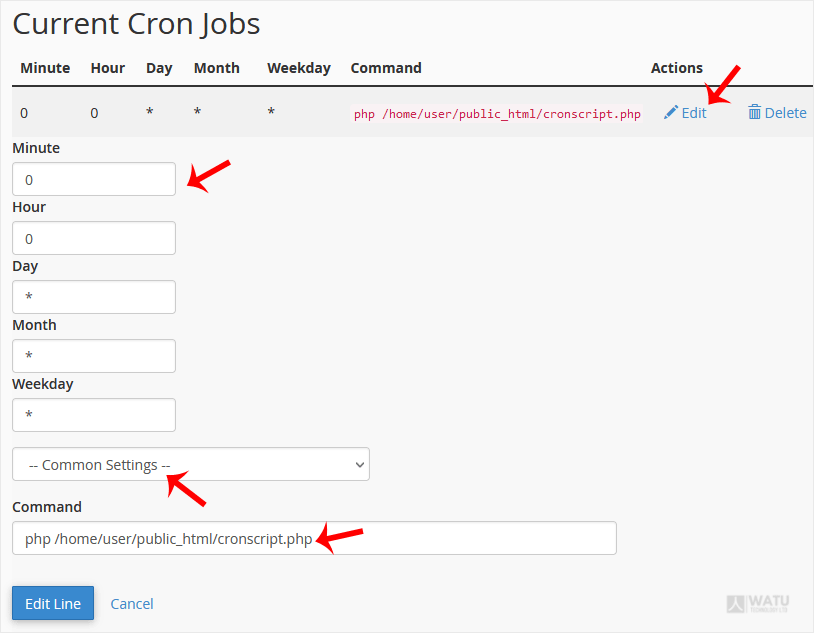
3. Scroll down to the end of the page. Under Current Cron Jobs, locate your cronjob and click on Edit.

4. Make the appropriate changes and then click on Edit Line.


How to Delete a Cronjob?
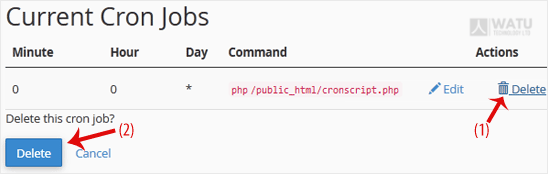
1. Under Current Cron Jobs, locate your cronjob and click on Delete.


2. Under the Delete this cron job?, click on Delete.

Was this answer helpful?

Related Articles

How to Reset cPanel's Account Password If you have access to your cPanel account, follow these steps to reset your password:1. Log in to... How to Change cPanel's Style/Theme Switching over to another cPanel theme with a different style is easy.1. Log in to your cPanel... How to Upload Files via the cPanel File Manager You can use cPanel's inbuilt file manager instead of an FTP program. 1. Log in to your cPanel... How to Edit (Dot)htaccess File in the cPanel File Manager 1. Log in to your cPanel account. 2. In the Files section, click on File Manager. 3. Navigate... How to Check the Disk Usage and the Bandwidth Usage of Directories If you are getting a disk space usage warning from cPanel and don't know which directory is using...
« Back

Powered by WHMCompleteSolution

  • Contact Us
  • Terms of Service

Copyright © 2026 Watu Technology LTD. All Rights Reserved.


Loading...
Loading...
Choose language
العربية
Azerbaijani
Català
中文
Hrvatski
Čeština
Dansk
Nederlands
English
English
English
Estonian
Persian
Français
Deutsch
עברית
Magyar
Italiano
Macedonian
Norwegian
Português
Português
Română
Русский
Español
Svenska
Türkçe
Українська

Choose Currency

Ksh KES
USD

Generate Password

Please enter a number between 8 and 64 for the password length