You can reply to an email using Mozilla Thunderbird instead of the cPanel Webmail.
1. Open Mozilla Thunderbird.
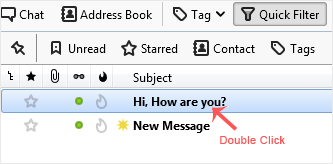
2. Click on the email you wish to open twice.
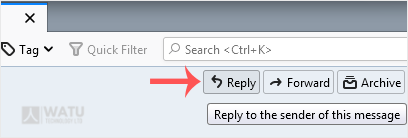
3. In the top-bottom area, click on Reply.
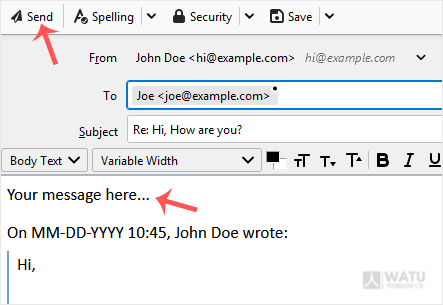
4. Type your message in the message box and click on Send.
- Home
-
Store
- Browse All
- Web Hosting
- Website Packages
- eCommerce Packages
- Google Workplace
- VPS Hosting
- WordPress Hosting
- Payment Integration
- Business Launchpad
- Website Backup
- Website Security
- Website Builder
- E-mail Services
- SEO Tools
- SSL Certificates
- VPN
- Professional Email
- Site Builder
- Register a New Domain
- Transfer Domains to Us
- Affiliates
- Contact Us
- Watu SMS Notifications
-
More