
We recommend changing the disk driver to Virtio or IDE before installing the operating system. Only change this before installing/reinstalling the OS.
1. Log in to your SolusVM Control Panel.
2. If you have multiple VPSs, select the appropriate one.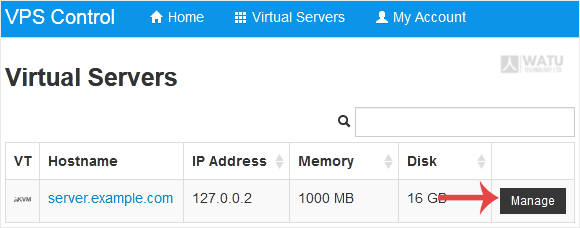
3. Scroll down. Under the Settings tab, you can find the Disk Driver option. Select the appropriate Disk Driver from the drop-down menu.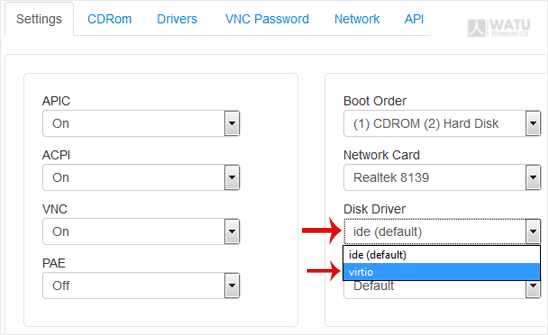
4. Reboot your VPS so that the changes can take effect.
- Home
-
Store
- Browse All
- Web Hosting
- Website Packages
- eCommerce Packages
- Google Workplace
- VPS Hosting
- WordPress Hosting
- Payment Integration
- Business Launchpad
- Website Backup
- Website Security
- Website Builder
- E-mail Services
- SEO Tools
- SSL Certificates
- VPN
- Professional Email
- Site Builder
- Register a New Domain
- Transfer Domains to Us
- Affiliates
- Contact Us
- Watu SMS Notifications
-
More
