
You can install a new WordPress theme without having any technical knowledge. It is so easy and automated.
1. Log in to the WordPress dashboard.
2. From the Dashboard menu, go to Appearance and click on Themes.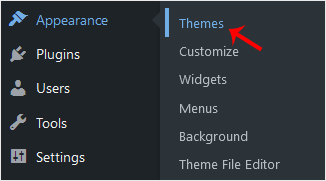
3. Click on Add New.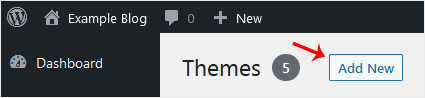
4. You can search for a theme using the search bar or browse the themes, choosing from Featured, Popular, and Latest.
5. Hover your mouse over the theme you like and choose Install.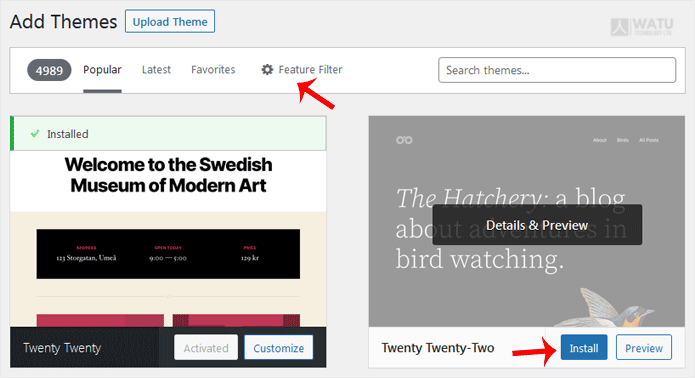
6. Click Activate on the newly installed theme.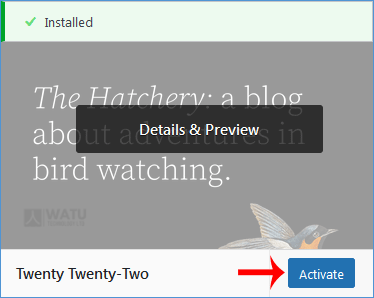
Congratulations, you have installed and activated a new theme on your blog.
- Home
-
Store
- Browse All
- Web Hosting
- Website Packages
- eCommerce Packages
- Google Workplace
- VPS Hosting
- WordPress Hosting
- Payment Integration
- Business Launchpad
- Website Backup
- Website Security
- Website Builder
- E-mail Services
- SEO Tools
- SSL Certificates
- VPN
- Professional Email
- Site Builder
- Register a New Domain
- Transfer Domains to Us
- Affiliates
- Contact Us
- Watu SMS Notifications
-
More
