Watu Technology LTD
  • 0 Shopping Cart
  • More
  • Account
    • Login
    • Forgot Password?
  1. Portal Home
  2. Knowledgebase
  3. CloudLinux (cPanel)
  4. How to Change the PHP Version via CloudLinux Selector in cPanel

How to Change the PHP Version via CloudLinux Selector in cPanel Print

  • 0

You can use CloudLinux's Select PHP Version to change your website's PHP Version. CloudLinux provides various PHP Versions to choose from.

1. Log in to your cPanel account.

2. In the Software section, click on Select PHP Version.

cP-CL-Select-PHP-Version-icon.gif

3. To the right side of the Current PHP version, click on the drop-down menu and choose the version you want to use.
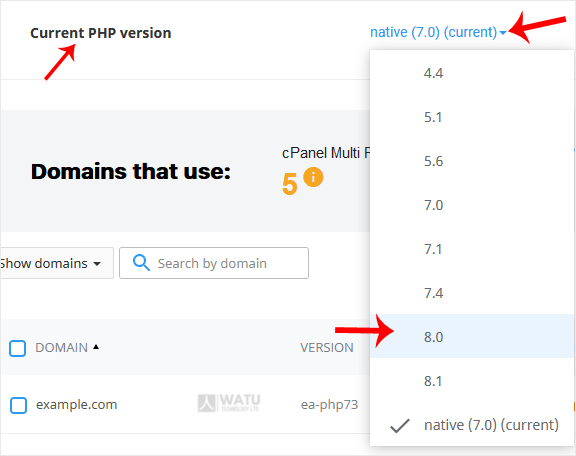
cP-CL-current-PHP-version-option.gif

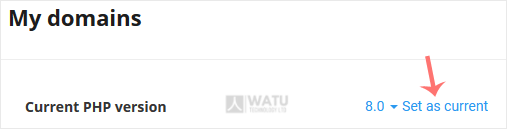
4. Click Set as current.

cl-set-as-PHP-version.gif


Was this answer helpful?

Related Articles

How to Increase PHP's upload_max_filesize Value Using CloudLinux Selector in cPanel You can modify PHP's upload_max_filesize as per your needs using CloudLinux's PHP Selector in... How to Increase PHP's post_max_size Value Using CloudLinux's Selector in cPanel You can modify PHP post_max_size as per your needs using CloudLinux PHP Selector in cPanel.... How to Enable or Disable PHP Extensions Using the CloudLinux Selector in cPanel You can use CloudLinux Selector to enable or disable available PHP extensions in cPanel.... How to Enable or Disable PHP's allow_url_fopen Using CloudLinux Selector in cPanel You can use CloudLinux Selector to enable or disable the allow_url_fopen directive in cPanel.... How to Enable or Disable PHP's display_errors via CloudLinux Selector in cPanel Sometimes, we need to debug PHP. Hence, we need to enable display_errors or disable them for...
« Back

Powered by WHMCompleteSolution

  • Contact Us
  • Terms of Service

Copyright © 2026 Watu Technology LTD. All Rights Reserved.


Loading...
Loading...
Choose language
العربية
Azerbaijani
Català
中文
Hrvatski
Čeština
Dansk
Nederlands
English
English
English
Estonian
Persian
Français
Deutsch
עברית
Magyar
Italiano
Macedonian
Norwegian
Português
Português
Română
Русский
Español
Svenska
Türkçe
Українська

Choose Currency

Ksh KES
USD

Generate Password

Please enter a number between 8 and 64 for the password length